Procedure Text : How To Use
How to use:GRAB APP
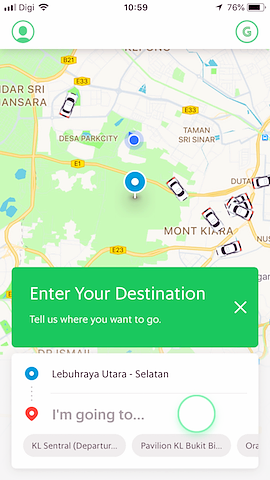
First ENTER YOUR DESTINATION
Enter in where you are and where you want to go. If your location doesn't show up accurately, just move the pin to exactly where you are.
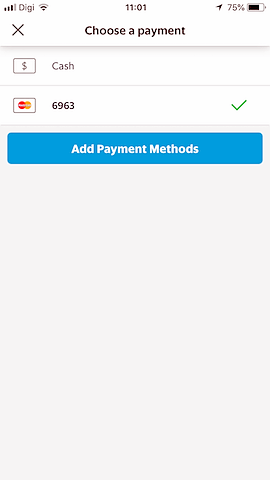
CHOOSE PAYMENT
Choose your payment method and pay with cash or with your credit card. Easy breezy.
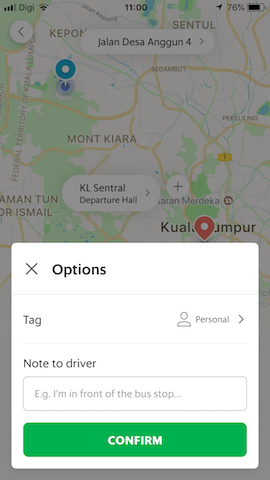
ADD DRIVER NOTES
If you're going to wait at a certain location, if there is a guard or gate to enter, or your house is numbered, enter those details in driver notes so they can locate you easily.
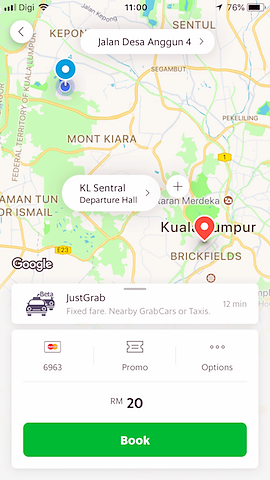
BOOK A RIDE
You'll receive an exact upfront fare before you book. Make sure your locations and payment method are correct, enter in any promos and notes, and then click book.
TRACK YOUR CAR
You'll get a driver acceptance message with a photo and name of your driver. Then you can track your car on its way so you can be ready for it. Easily call or text your driver if needed right from the app. You can also share your journey with friends.
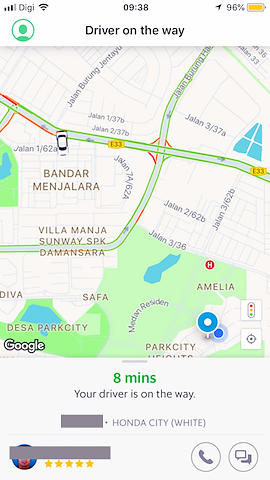
Final ARRIVAL NOTIFICATION
An arrival notification and a popup message will alert you when your car has arrived. It will display the make, model, color and license so you know exactly what to look for.


Komentar
Posting Komentar